
Example Quote - Basic Website Project
See a real-world example of a professional quote in QuoteScope, including organizational sections, optional items, and time-based pricing.
New to quotes? For a step-by-step guide to creating your first quote, see the Quotes Guide. If you want to get started quickly, check out the Quick Start.
This page walks you through a practical example of a quote, highlighting how different item types, recurring billing, organizational features, and client selections work in QuoteScope. Use this as a reference to better understand how to structure your own professional quotes.
Example: Website Project Quote
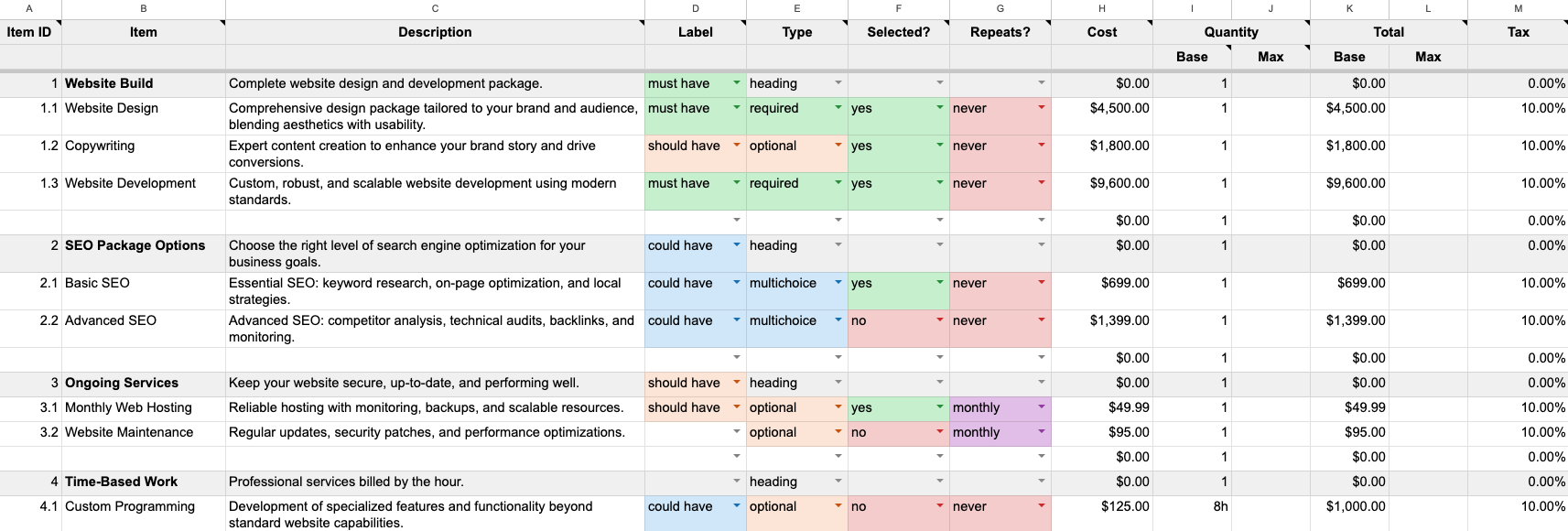
Below is a screenshot of our basic website project quote template, created in Google Sheets using QuoteScope:
See a preview of the published quote.
Try it yourself: In Google Sheets, go to Extensions → QuoteScope → New Quote → Basic Website Quote to create this exact example and experiment with it.
Let's break down how this quote is structured and what each section means:
Quote Structure Overview
This quote demonstrates several key features that make quotes both professional and interactive:
- Organized Sections: Using headings and Item IDs to create a clear hierarchy
- Mixed Item Types: Required items, optional add-ons, and choice-based options
- Recurring Billing: One-time costs vs. ongoing monthly services
- Importance Badges: Visual indicators showing clients what's essential vs. nice-to-have
- Time-Based Pricing: Hourly work with flexible time estimates
Section-by-Section Breakdown
1. Website Build (Core Package)
Section Header: "1 Website Build" acts as a heading to organize related items
- 1.1 Website Design (Required, Must Have): $4,500 - Always included, marked as essential
- 1.2 Copywriting (Optional, Should Have): $1,800 - Selected by default but can be removed
- 1.3 Website Development (Required, Must Have): $9,600 - Always included core service
This section shows how to group related services under a clear heading, mixing required items with optional add-ons.
2. SEO Package Options (Choose One)
Section Header: "2 SEO Package Options"
- 2.1 Basic SEO (Multichoice, Could Have): $699 - Selected by default
- 2.2 Advanced SEO (Multichoice, Could Have): $1,399 - Alternative option
This demonstrates multichoice groups - clients must pick exactly one option from this group (or neither). The options are consecutive in the spreadsheet, which automatically groups them together.
3. Ongoing Services (Monthly Recurring)
Section Header: "3 Ongoing Services"
- 3.1 Monthly Web Hosting (Optional, Should Have): $49.99/month - Selected by default
- 3.2 Website Maintenance (Optional): $95/month - Not selected by default
Shows how to present recurring monthly services that clients can add or remove independently.
4. Time-Based Work (Hourly Services)
Section Header: "4 Time-Based Work"
- 4.1 Custom Programming (Optional, Could Have): $125/hour for 8 hours = $1,000
This demonstrates time-based pricing where you can specify hours (like "8h") and QuoteScope automatically calculates the total cost.
Key Features Demonstrated
Item Organization
- Item IDs (1, 1.1, 1.2, etc.) create a professional hierarchy
- Headings organize related items into clear sections
- Blank rows provide visual separation between sections
Item Types & Behavior
- Required: Always included items (core services)
- Optional: Add-ons clients can include or exclude
- Multichoice: Groups where clients select one option
- Heading: Section titles that don't affect pricing
Importance Indicators
- Must Have: Essential items shown with green badges
- Should Have: Important items with purple badges
- Could Have: Nice-to-have items with blue badges
Billing Frequencies
- Never: One-time costs (most items)
- Monthly: Recurring monthly charges (hosting, maintenance)
- Yearly: Annual recurring services
Time-Based Pricing
- Enter time like "8h" for 8 hours or "2h 30m" for 2.5 hours
- QuoteScope automatically calculates: Time × Hourly Rate = Total Cost
- Perfect for consulting, development, or any hourly work
What Clients Experience
When clients view the published quote, they see:
- Clear Organization: Items grouped under professional headings
- Importance Badges: Visual cues showing what's essential vs. optional
- Interactive Choices:
- Checkboxes for optional items
- Radio buttons for multichoice groups
- Real-Time Totals: Pricing updates instantly as they make selections
- Separated Billing:
- One-time costs: $15,599 - $16,898 (depending on selections)
- Monthly costs: $49.99 - $144.99/month (depending on selections)
Flexible Pricing Example
In this quote, depending on client choices, the total could range from:
- Minimum: Basic required items only
- Maximum: All optional items plus advanced SEO option
This gives clients control while ensuring you're covered for different scope levels.
Best Practices Shown
- Start with a clear structure using Item IDs and headings
- Group related items under descriptive section headers
- Use importance levels to guide client decisions
- Separate recurring costs from one-time expenses
- Provide detailed descriptions so clients understand what they're getting
- Include assumptions and notes to prevent misunderstandings
This example shows how QuoteScope helps you create professional, interactive quotes that are easy for clients to understand and customize to their needs. For step-by-step instructions on building quotes like this, see our Quotes Guide.